Friday, 3 February 2017

How to Create a Facebook Custom Audience

To create your first Custom Audience, go to the ”Audience” section of the Facebook Power Editor or Ads Manager.

In the Ads Manager, it’s under the Tools section. Select “Audiences.”
Ads manager custom audience
In Power Editor, it has its own section, right under the the toolbar right beneath your ad account number:
power editor custom audience 

Since this is your first Custom Audience, you’ll need to create a new one by clicking the green “Create Audience” button. A popup window will open and ask you to pick which type of audience you’d like to create:


Types of Custom Audiences

There are many types of custom audiences, and Facebook is increasing them every day.
  • Customer List (a.k.a. Standard) Custom Audiences
    A list of emails, phone numbers, or Facebook User IDs that Facebook will match them with it’s users. Facebook will usually match between 60-80% of the contacts on your list. Uploading this list usually has to be done manually, unless you use a Custom Audience Sync tool.
  • Website Custom Audiences
    Instead of users’ email addresses or phone numbers, you can insert a Facebook Pixel tracking code on your website and target your Facebook Advertising to all users that have visited a specific page on your website during a set time period (up to 180 days)!
  • App Activity Custom Audiences
    You can create audiences based on what actions people take when they use your app – either on Desktop or Mobile. Mobile has outpaced Desktop on Facebook, and the trend continues. If your business has an app associated with it, it needs to be utilizing custom audiences on Facebook.
  • Engagement Custom Audiences
    You can create audiences of those who engage with certain ad types or your page. The duration of these ad types is up to 365 days, although the more recent is often better – it is engagement after all.
  • Lookalike Audiences
    Once you’ve created a Custom Audience, you can ask Facebook to create a broader “Lookalike Audience” to target your ads to. Facebook will look for patterns and characteristics your current users, leads, or customers, have in common – such as age, gender, or interests – and create a much bigger list of very similar users who most likely have never interacted with your business before!
  •  https://adespresso.com/academy/blog/facebook-ads-custom-audiences-guide/#create%20audience

Thursday, 2 February 2017

10 Facebook Marketing Tips for 2017

Facebook is evolving. What started out as a place to share cat photos has turned into a network of 1.79 billion active users. That's billion, with a 'B'.

And for marketers, the platform has changed as much as it has for users.

The platform has changed completely in just a few years, and staying up to date with those changes can be a challenge. That's why we're highlighting some new marketing tips for Facebook in this article. These ten Facebook marketing tips take into account the way the platform has changed into 2017, and highlight the features and strategies marketers need to use going forward.

1. Get Comfortable With Shooting Video

Video on Facebook accounts for just 0.9% of all posts. Here's the crazy thing about that: these same 0.9% of posts account for 7.15% of all reach on the network. And that number is growing.

Video posts are dominating social media, with Facebook emerging as YouTube's largest contender for video uploads. If you haven't started marketing with video on Facebook, now's the time to begin.

We're seeing huge reach in industries across the board. You don't need to be a professional videographer to capitalize on this either - all you need is a smart phone, some good lighting, and maybe a few goodies from Amazon. Here's a step by step guide to shooting pro quality video on your mobile phone.

2. Set Up Saved Audiences

Saved Audiences can be extremely useful - especially if you want to target a specific market.

Within Facebook's Business Manager, you can create custom audiences based on set parameters. This enables you to advertise to specific groups of people, making sure that your niche content meets the right demographic.

For example, we recently wrote an article that was specific to mortgage lenders - not, by any means, the bulk of our Facebook fans. By creating a Saved Audience, we were able to target a group of mortgage lenders within the USA who were also interested in marketing with our niche piece of content. This drew the right audience to our content, drumming up business for our company and eyeballs on our brand.

Test it out for yourself - it's 100% free to set up, so you can see how large your audience is before you start paying for advertisements.

3. Try Your Hand at Retargeting

If you own a business and you have a website, you absolutely must start a retargeting campaign - it's one of the most profitable forms of advertising online.

In a nutshell, retargeting enables you to advertise to people who've already visited your website. All you have to do is install Facebook's tracking pixel on your website, and wait for visitors to roll in.

4. Add Captioning to Your Videos

Facebook recently announced that they're expanding access to their automated video captioning tool to all users, but we're slightly skeptical of this option.

YouTube has similar software, and to be honest, it's pretty bad.
And here's the thing: your captioning matters. 90% of viewers on Facebook watch videos without sound, meaning that your captions are going to be read by a majority of your viewers. Either add the captions yourself or do what we do: hire someone on Fiverr to do it for you. For about five bucks you'll get an accurate SRT file that you can upload to Facebook in a couple of clicks.

5. Add a Call To Action on Your Page

Facebook added this functionality and every page owner should take advantage.

On your Facebook Business Page, you can add a call to action that sits in the bottom right-hand corner of your cover photo. These buttons make it easy for your fans to get in touch with your business - don't miss out on some extra site traffic. 

6. Upload Your Email List

If you have a large e-mail list, you need to upload it to Facebook. Once it's finished loading, you'll be able to advertise to every single e-mail that's associated with a Facebook account.

Similar to retargeting, this practice is great because it enables you to utilize multiple touch points with your potential customers. Take advantage of their past interest in your brand, and try running a Like or engagement campaign to encourage them to interact with you on social media.

The more ways you can reach your audience, the better.

7. Be Responsive To Messages

There's more and more evidence indicating that Facebook is calculating response time into their algorithm, so be sure to respond to messages. Your response time will also be live on your page, so fans will be able to see how quickly you interact with them.

When I gave my Social Media Predictions for 2017, one of the main points of focus was on the adoption of Messenger for business. At Cave, we're seeing B2C interaction moving towards social messaging in great numbers this year, so be sure to buck the trend and respond as quickly as possible.

8. Embed Your Facebook Content

If you see a good fit to sneak your Facebook content into a blog post (or anywhere else online), I highly recommend you take advantage of the opportunity.

Mixing together different forms of content is a great way to create more touch points with your potential customers.

Facebook also makes it easy to embed content - just click in the upper right-hand corner of your post, copy, and paste (you can see a real world example of this tip in point nine below)


9. Shoot Live Video

Video production is going to be a major theme for social media in 2017, and live video, in particular, is going to grow greatly.

Don't get us wrong - you need to be able to master staged video first, but once you get the hang of it, stepping in front of the camera and shooting live has a ton of advantages.

The most important reason to test out live video is the increased reach. Live videos get a boost in Facebook's algorithm, giving you a push into more and more people's feeds.

Here's a video we shot on Facebook Live, going over a few tips for using the live feature.

10. Have Fun

I say this every year, and 2017 will be no exception.
You need to be social on social media. It's not a soap box, it was built so that individuals around the world could connect with one another.

If you want to increase your reach, commit to being personal - talk about what your know and your experiences, and have some fun with it. There's a reason we drink beers at the beginning of every episode of In The Cave - we enjoy it. If we're having fun, there's a better chance our viewers will be having fun too.
Hopefully this gave you some ideas about how to use Facebook to market your brand online in 2017.
http://www.socialmediatoday.com/marketing/10-facebook-marketing-tips-2017


Wednesday, 1 February 2017

Facebook Marketing: A Comprehensive Guide for Beginners

Facebook is big. As the largest social network in the world, it has more than 1.23 billion active users, 62% of whom log in on a daily basis. With such a large user base, ignoring Facebook really isn’t an option for most marketers. You can bet your ideal market is using Facebook nearly every day. The question is: how do you target all of those users with your marketing? The good news is that the Facebook advertising platform allows you to zero in and specify the type of people you’re looking for. You can target by location, demographics, and interests. In this guide, I’ll show you the basics of how to use Facebook to your advantage. The guide is aimed at the beginner who wants an introduction into marketing their business on the world’s largest social network.

Who’s On Facebook?

Facebook may have started out as a social network for college students, but, by now, nearly everyone with an internet connection is using it. The minimum age requirement is 13, and there is reason to believe it is being used by all other age groups.
Facebook doesn’t publicly release data on their most popular age group, but a survey by Pew showed that social networking is most popular with the 18-29 age group. Its popularity decreases with age. It is least popular with those 65 and older.
I can assure you that, no matter what age group you’re targeting, there will be more than enough of those users on Facebook.

How Can You Market on Facebook?

Facebook has three tools (pages, ads, and groups) that can be used by anyone. Each of these options has its own purpose, and they can be combined for greater reach.

Pages
Facebook pages are similar to profiles, but for businesses, organizations, and public figures. Users can “Like” a page, which means they’ll automatically receive updates from that page in their news feed. Users also have the option to “Like” a page but not follow it. (Users also can follow some profiles.)
While profiles require a mutual relationship between friends, pages can be liked by anyone, without a requirement for the page creator to accept a fan. They also don’t have a restriction on the number of friends/fans they can have (unlike profiles, which are limited to 5,000 friends).
Advantages: Pages are free and easy to set up.
Disadvantages: It can be hard to get a foothold and build a fan base with a page.

Ads
Facebook offers a fantastic targeted advertising platform. You can create ads targeted at specific geographic areas, ages, education levels, and even the types of devices used for browsing. Facebook also lets users close ads they don’t like and “Like” a page right beneath an advertisement:
att-facebook-ad-like-page
Advantages: Ads have powerful targeting parameters.

Disadvantages: Ads can get expensive, depending on your goals.

Groups
Facebook groups are similar to discussion forums, but with additional features that pages and profiles have (like a wall). You can create groups related to your industry or product offerings as a way to reach out to potential customers.
Advantages: Groups are free and have high levels of engagement.
Disadvantages: Groups can be very time consuming.

How to Market with Pages

Facebook pages are the simplest, easiest way to get started marketing with Facebook. They’re free, relatively easy to set up (at least in their basic forms), and incredibly flexible. There’s not much of a downside, either.
Unfortunately, many companies don’t use them to their full potential; or worse, use them badly. These guidelines will help you avoid making those mistakes.

Profile Photo and Cover Image
Your profile photo should be your logo. Simple as that.
The cover image is a different story. It’s really up to you to decide what to put here. Some use photos of employees, while others use fancy artwork and put their contact information in the cover image. Pick a photo that will enhance your page and draw the eye of your visitors. 

“About” Section
The “About” section is prominently placed right below your company logo. This is your chance to tell anyone coming to your page what your business does.
Make sure you put good information here, telling people what you’re company does, why you’re different, and other interesting details. If you can, take the time to write it specifically for your Facebook audience. You can copy the text from the “About” page of your website or blog, if you’re in a pinch. Be sure to fill in all of your data under “Basic Info.”
Just remember to keep it friendly and informal. A casual tone usually works best on Facebook. Here are a few good examples:
HubSpot tells us what they do and gives a contact method:
hubspot-facebook-about
WP Engine shares what they do and the number of customers they have, which helps establish credibility:

wpengine-facebook-about-1
You also may want to put your hours of operation in the About section. 

 
Tabs
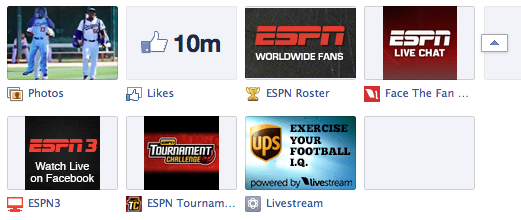
Tabs are the little squares that sit to the right of your About section. Here are ESPN’s tabs:
espn-facebook-tabs
Facebook allows you to use up to 10 application tabs, known to Facebook admins as the “Favorites” section. Photos and Likes are required tabs. You may move the Likes tab wherever you wish, but Photos must remain as the first. Your top tabs are set to a limit of four.
Think about what the priorities are for your visitors. If you’re a physical store, you may want to make a tab for location. If you host webinars, perhaps you could use the Events tab to let people sign up and join your webinars. Social media is about engagement, so the more (and the more closely) you get your fans to engage with you, the better marketer you will be.

Post Useful Information to Your Wall
What you post to your wall will show up in the news feeds of everyone who has “Liked” your page, just as it does when you post something to your personal profile.
So, make sure what you’re posting is useful to your fans. Don’t post endless updates about the same thing, and don’t post too many updates, clogging the news feeds of your fans.
Here are some ideas for the kinds of things you might want to post to your wall:
  • Links to articles related to your company or your industry
  • Links to your blog posts
  • Coupon codes for fans to save on your products
  • New product announcements
  • Links to online tools your fans might find useful
Again, make sure that your posts are useful. Also, don’t post more than a few times each day unless there’s a special event going on.

Ask Your Fans Questions
Getting your fans involved with your page is a great way to inspire loyalty.
Asking questions in your updates gets people involved, but on their own terms. What you ask depends largely on your product and your niche, but asking open-ended questions usually garners the best responses. Asking opinions on a new product idea or project can be a good way to convince your fans that your company cares about what they want. Getting more engagement on a post may also help you reach the top of the Facebook News Feed.

Don’t Spam
Spam is one of the quickest ways to lose fans. If you do nothing but send out promotional blurbs about your company, without ever adding anything of value, then you’re going to have a hard time getting and keeping fans.
Before you send out any update, ask yourself if it honestly adds value to the conversation. If not, don’t send it.

Study Your Statistics and Results
Facebook offers some really great analytics for pages. Pay attention to them. If you see a big surge in fans (or a drop off), look at what you’ve posted recently and see if you can figure out a reason for the trend. Then, post more of that kind of content (or less, if you’re losing fans).

Targeted Advertising

Because it gathers so much demographic information about its users, Facebook has one of the best targeted advertising programs online. You can target users based on virtually anything you might find in their profiles, as well as track your success with each segment.
Ads can be run on a per-impression or per-click basis. Facebook shows you what bids are for ads similar to yours, so you know if your bid is in line with others in your industry. You also can set daily limits so there’s no risk of blowing your budget.

Types of Facebook Ads
There are a number of ad subtypes you can choose from.
You can create ads that direct to your Facebook page, or to a site not on Facebook. You can create ads to promote a Facebook event, complete with an RSVP link. You can create ads for mobile app installs and app engagement. 

Users Can Hide Your Ad
Facebook used to offer the option to “Like” any advertisement on Facebook. Not anymore. People can “Like” an advertisement (if it’s that type) or hide the ad. Upon closing an ad, Facebook asks the user to specify why they didn’t like it.
It’s valuable information, providing insight into why your ads might not be doing very well.

Powerful Targeting Options
As already mentioned, Facebook has some of the most powerful targeting tools of any online advertising program.
You can target by virtually anything on a user’s profile. You might start with the location, if that’s important. You can specify either city, zip code, county, or state. This works particularly well for local businesses. From there, you can choose basic demographics, including relationship status, age, workplace, education (including major and years of attendance), birthday, and much more.
You can target ads to people who have recently moved. So, if you own a gym in Scottsdale and want to find all the individuals who recently moved to the area, you can target your ads and ad copy to those individuals.
You also can target people based on their interests. Say, for example, you have a product that’s targeted at baseball fans. You could enter baseball in the Interests field.
Or, maybe you’ve written a book and you’re sure that people who like another certain book will like yours. Enter the book’s title under Interests, and you’ll specifically target those users.
You even can target a private list of users. If you have a list of email addresses of people that you want to target, you can use Facebook’s ads manager to target just those people. So, if you run a SaaS business and have 200 people on your “prospect list,” you can use their email addresses to target them with ads in Facebook. 

Customize Your Ads
The other big advantage to tightly-targeted ads is that you can create different ads for different demographic groups. Better-targeted ads are going to garner better results.
If you’re targeting baseball fans, you might create individual ads for different popular teams. You could have one ad specifically aimed at Red Sox fans, one at Yankees fans, and another at Cubs fans, and then have those ads shown only to people who have indicated in their Interests that they are fans of those teams.
Or, let’s say you’ve targeted people based on their love of a particular book. You could mention that book in the ad itself to make it more likely to catch their attention. Create different ads for different books, and then target accordingly.

Conclusion 

Facebook isn’t just powerful. It’s flexible. No matter what type of company you run, it has enough different marketing options that you can tailor your marketing efforts to fit your company, your budget, and your time constraints.

Yes, it can take some time to get to know all of its features, but it’s worth it. Facebook still is growing at a rapid pace, and every day it becomes a more indispensable part of social media marketing.
It’s also important to strike while the iron is hot. For the moment, companies that are savvy about Facebook marketing still enjoy an early-adopter advantage. Once more traditional marketers start transitioning into the space, competition will increase, advertising prices will rise, and users will become much pickier.
If Facebook is not a current part of your marketing campaign, it should be. Set aside some time to tinker around, start a few test campaigns, and see what happens. Like anything, it takes practice to get good at it.
My advice: get started now.

About the Author: Zach Bulygo is a Content Writer for Kissmetrics. 
https://blog.kissmetrics.com/facebook-marketing/ 

Monday, 30 January 2017

3 Social Media Trends That WIll Dominate 2017

Social media is one of the fastest changing industries out there. Sometimes a cutting-edge technology changes the social game, or an old idea (e.g. virtual reality) gains viral popularly. Either way, the results always have a huge impact and 2017 will be no different. Here are five social media trends that will dominate 2017.


1. Social messaging
When people discuss social media, there always seems to be more focus on social networks than social networking. That’s pretty strange, considering that messaging apps have a much wider community of users than social networks. In fact, WhatsApp, Facebook Messenger, Viber and WeChat together have more users than the big networks: Facebook, Twitter, LinkedIn, and Instagram.
Over-the-top (OTT) messaging and SMS messaging are millennials’ preferred form of communication. Sixty-two percent of millennials are more loyal to brands that engage them via those channels and an estimated two billion users will be messaging through OTT apps by 2018. Why is this so? Millennials want the personal touch, transparency and collaboration that the one-on-one communication allows.

Businesses are already taking advantage of the huge audience base on social messaging platforms -- on Facebook, you can click on an ad and it takes you directly to a chat window with the brand. As more brands start to realize the value of social messaging compared to regular social networks, they’ll make even more efforts to have a presence there.


2. The fight against fake news
Every year, more and more people, especially millennials, are turning to the internet as their main news source instead of TV, newspaper, or radio. As a result, there’s been a rise in “fake news” from sites that deliberately publish and circulate inaccurate information about current events.

We saw the worst of it during the 2016 presidential election -- fake news about both candidates was shared widely across Facebook, Twitter, and other social platforms. Now, Facebook is already taking steps to curb fake news appearing on the site. These “news outlets” are no longer allowed to advertise on the platform.

But the fight against fake news isn’t likely to stop there. Germany is already considering legislation to fine social media sites that let fake news proliferate. That’s bound to catch the attention of all the major platforms. Millennials are tech-savvy, get their news predominantly from social media and value honesty, so they’re likely to investigate and verify news they see, push for more transparency from media outlets and reward factual reportage by sharing such content.
 

3. Authentic content (a.k.a. live video)
YouTube was built on a foundation of videos that capture real, unfiltered moments. Now social media is taking it to the next level by offering the content in real-time. Live streaming video was first made popular by Twitter’s Periscope. Now Facebook Live has launched. Social videos have much more engagement than any other content format, and have been responsible for a lot of growth on Facebook. Even news sources are citing Facebook Live videos when covering major events. The world of media is changing thanks to live video.


Instagram is now testing their own live video option, and they won’t be the last platform to implement live streaming video. Social media is becoming fascinated with live, authentic content. Millennials love video content and are the most active video viewers of any age group in the U.S. in 2016 and they're not likely to slow down in 2017.

I cover how to use social media to level up your career

Thursday, 26 January 2017

More Ways to Monetise Your Blog - Cost Per Mile Advertising


Cost per Mile advertising (CPM) is similar to PPC advertising, however instead of getting paid on a per-click basis, you get paid according to the number of impressions (page views) you get. This is worked out for every 1000 impressions that it has. For example, a website that gets 200,000 page views per month that displays a $1 CPM ad will generate you $200 a month!

There are a number of different CPM providers out there that you can get ads from. Each varies on how much they will pay you, generally the better the provider the higher rate you will be paid. This is because the best providers have access to more and better quality advertisers that are willing to pay you more.

Just like PPC, CPM adverts can pay you more depending on where the advert is placed on your website. The higher the ad is placed and the bigger the ad is, will generally make you more money.

CPM adverts are beneficial for websites that have lots of traffic and a high page view per visitor ratio, but it is still a good option to consider when looking to monetize your blog.

Wednesday, 25 January 2017

Ways To Monetize Your Blog & Make Money Blogging!

Ways To Monetize Your Blog & Make Money Blogging!


There are many different ways to generate money with your website online. Unfortunately, too many people often give up because at that present time they aren’t making any money at all. My advice is not to give up! It takes time to build a site that will make you money, though with the right direction, planning and hard work this can be achieved quicker. It all depends on how you monetize your blog!

The following list is a collection of many of the different ways of making money with your website. Depending on what your website is about, a large number of these techniques can be implemented to earn you cash. But don’t get disheartened if one method doesn’t work for you just try a different one and build upon that!
I hope this list helps you to see the variety of ways that you can begin to earn money online.


1. Pay Per Click Advertising

You can probably guess from the name how you monetize your blog from this method. You get paid for every click a visitor makes on these ads. You sign up to a provider and they give you a code for you to place on your site. The provider will then send contextual ads to your site (either image or text based) that are relevant to the content of your website. Google AdSense is the most widely used provider of this service, but there are many others out there.


Pay Per Click (PPC) ads vary in profitability depending on the amount of traffic your website gets. Only a small percentage of people will click on these ads, so to earn a lot of money from them you will need a lot of traffic.


The click-through rate (CTR) of your visitors depends on the design of your website. Certain parts of your website pages are more valuable than others, so to increase your CTR these PPC ads can be placed there. For example, space at the beginning and end of articles/blog posts are highly visible, so by putting a PPC in these positions may increase the chances of someone clicking on one. If on the other hand you place these ads at the bottom of the page where nobody can see them, then nobody will click on them.


The cost per click (CPC) can also determine how much you are likely to earn from this type of ad. Adverts that display financial products or mortgages will generate you more income due to the higher price of the actual product, compared with perhaps children’s toys. The former may pay you as much as $1+ for every click through by one of your visitors, whereas a click on toys may pay you only a few cents.

Which ads shows up on your site is dependant on the content of your website. After all, it would be daft showing financial products on a website that talks about children’s toys and vice versa.


PPC ads are a good way to easily monetize your blog. However, to make serious money from them you will need lots of traffic.

You can find PPC adverts for your website at these popular sites:

More coming soon....

How do you monetize your blog? What is your experience with PPC?  
http://onlineincometeacher.com/money/30-ways-your-website-can-earn-you-money/ 


Monday, 23 January 2017

Instant success is a myth - Don't give up!!

“I’ve failed over and over and over again in my life and that is why I succeed.” -Michael Jordan

We’ve all heard stories of the overnight rise to fame. But the truth is that what looks like an instant or overnight success is always preceded by years of struggle and work.


There’s a long, hard road to success, but when success hits we only focus on the last mile or so. It looks so easy, and makes for such a great story, that we ignore the miles and miles of obscurity, difficulty, and perseverance required to get to that hill top of glory.

Those stories make us feel that if we haven’t achieved a high level of success in a matter of days or months, we must be doing something wrong. And we are: we’re listening to make-believe stories as if they were guidelines to how life actually works.

By Annie Muellerhttp://www.lifehack.org/articles/communication/8-reasons-why-you-shouldnt-give-easily.html